About MILAAN HOME AUTOMATION
1. Control and Schedule all the appliances from the mobile anywhere, anytime. 2. Manage Access to other users by joining them into your home. 3. Control all your IR appliances like TV, Set Top Box, Air Conditioner,...
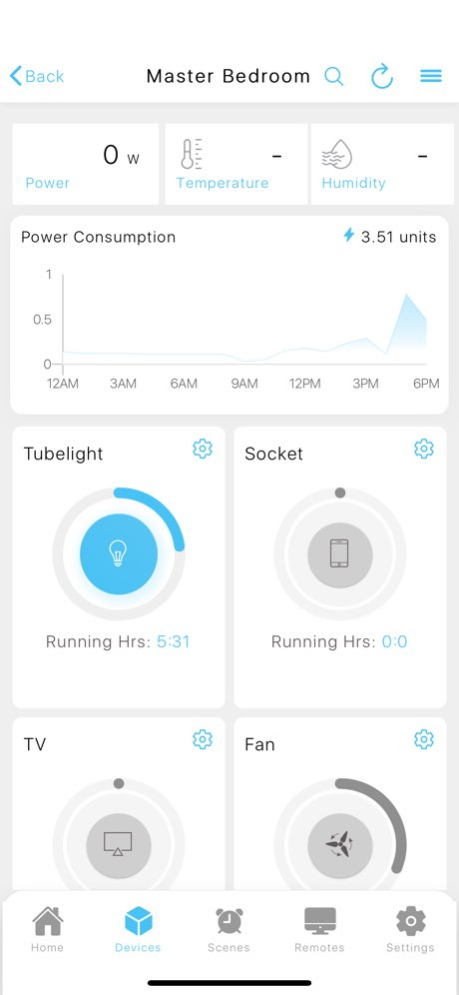
1. Control and Schedule all the appliances from the mobile anywhere, anytime. 2. Manage Access to other users by joining them into your home. 3. Control all your IR appliances like TV, Set Top Box, Air Conditioner, Projector etc. 4. Get a personalised and elaborate Entertainment Program Guide, to keep track of what's playing on your TV. 5. Schedule all your appliances using Routines and Scenes. 6. Create Workflows to do a set of actions based on room temperature, motion etc. 7. View real-time power consumption and energy stats of the appliances. 8. Control All your appliances using voice with Google Assistant and Amazon Alexa.
Previous Versions
Here you can find the changelog of MILAAN HOME AUTOMATION since it was posted on our website on 2024-02-15 21:10:29.
The latest version is 3.1.3 and it was updated on 2026-10-07 03:22:43. See below the changes in each version.
MILAAN HOME AUTOMATION version 3.1.3
Updated At: 2026-10-06
Changes: Version History Home Screen Widgets
Add widgets to your Home Screen and control devices without opening the app.
Siri Shortcuts
Siri shortcuts now run in the background without launching the app.
Conditional Automations
Automations now support conditions. Set rules like "Execute only if" a switch is on, or a sensor value matches a threshold, and combine multiple conditions with AND/OR logic.
Shortcuts
AC shortcuts now carry the full device state, including temperature, fan speed and mode.
Curtain shortcuts can be added alongside switch shortcuts.
Zigbee Scene Remotes and Touch Panels
Added support for Zigbee scene remotes and touch panels. You can now select, enable, or disable the physical remote for the new touch panels.
Energy Meter Improvements
No more data loss during connectivity issues. The device now keeps a running total of energy consumption locally and reports it once the internet is back, so deltas stay accurate. Enable this in Settings > Preferences.
Added new events for supported energy meter devices, including low voltage, low current, and phase fault.
Curtains
Added curtain calibration for selected models.
Scenes and Routines
Duplicate any scene with a single tap, then edit and save it as a new one.
Cancel a scheduled routine for a single occurrence directly from the notification or from within the app, without deleting the schedule.
Fixes
Multiple bug fixes and stability improvements for Zigbee devices. 3.1.3 4d ago * Added login session management with device-wise session view and logout from individual or all devices
* Added new workflow triggers:
* When smart lock is unlocked
* When doorbell rings
You can now automate switches, notifications, curtains, and more from these events
* Added color temperature value input for scenes on supported lights
* Added event history for Zigbee smart knobs and Zigbee smart switches
* Added device selection option for home page power consumption graph, including “All Devices” view
* Added detailed energy consumption insights for smart plugs, similar to energy meters
* Added notifications when a door sensor remains open for more than a configured duration
* Improved Zigbee device support and overall Zigbee experience
* Improved sensor history for Zigbee and Wi-Fi sensors
* Improved lock home UI/UX with additional security enhancements
* Improved lock notifications by intelligently grouping burst events
* Added troubleshooting guide for offline devices
Bug fixes:
* Fixed NFC scene actions not working on Android
* Fixed home page unreachable devices count issue
* Fixed device online/offline status issues on home page
* Multiple feature-specific and UI-related bug fixes and improvements 3.1.2 Jun 5 What’s New in This Update
We’ve packed this release with performance improvements, new device support, and usability enhancements to make your smart home experience smarter, safer, and more responsive.
New Features
• Adjust font size within the app for improved accessibility and comfort
• Fan speed control is now available directly in Home screen switch shortcuts
• Lock Home now supports alerts triggered by motion sensors and camera-based motion detection for enhanced home security
Performance Improvements
• Significantly improved Home page loading time for a faster, smoother experience
Expanded Device Support
• Added support for Zigbee-based devices, including:
– Gas sensors
– Smoke sensors
– Vibration sensors
– Motion sensors
– Scene remotes
– Smart knobs
• All supported Zigbee devices now work seamlessly with workflows and automations
• Added support for water tank level sensors, including automation and workflow integration
Siri & Automation Fixes
• Fixed an issue where Siri Shortcuts were not executing reliably
Enhancements & Fixes
• Miscellaneous UI enhancements for a cleaner and more intuitive interface
• Bug fixes and stability improvements
Update now to enjoy better performance, smarter automation, and improved home security 3.1.1 Feb 9 -minor bug fixes. 2.8.1 04/15/2025 2.5.1 04/05/2023
MILAAN HOME AUTOMATION version 3.1.3
Updated At: 2026-10-02
Changes: Version History Home Screen Widgets
Add widgets to your Home Screen and control devices without opening the app.
Siri Shortcuts
Siri shortcuts now run in the background without launching the app.
Conditional Automations
Automations now support conditions. Set rules like "Execute only if" a switch is on, or a sensor value matches a threshold, and combine multiple conditions with AND/OR logic.
Shortcuts
AC shortcuts now carry the full device state, including temperature, fan speed and mode.
Curtain shortcuts can be added alongside switch shortcuts.
Zigbee Scene Remotes and Touch Panels
Added support for Zigbee scene remotes and touch panels. You can now select, enable, or disable the physical remote for the new touch panels.
Energy Meter Improvements
No more data loss during connectivity issues. The device now keeps a running total of energy consumption locally and reports it once the internet is back, so deltas stay accurate. Enable this in Settings > Preferences.
Added new events for supported energy meter devices, including low voltage, low current, and phase fault.
Curtains
Added curtain calibration for selected models.
Scenes and Routines
Duplicate any scene with a single tap, then edit and save it as a new one.
Cancel a scheduled routine for a single occurrence directly from the notification or from within the app, without deleting the schedule.
Fixes
Multiple bug fixes and stability improvements for Zigbee devices. 3.1.3 20h ago * Added login session management with device-wise session view and logout from individual or all devices
* Added new workflow triggers:
* When smart lock is unlocked
* When doorbell rings
You can now automate switches, notifications, curtains, and more from these events
* Added color temperature value input for scenes on supported lights
* Added event history for Zigbee smart knobs and Zigbee smart switches
* Added device selection option for home page power consumption graph, including “All Devices” view
* Added detailed energy consumption insights for smart plugs, similar to energy meters
* Added notifications when a door sensor remains open for more than a configured duration
* Improved Zigbee device support and overall Zigbee experience
* Improved sensor history for Zigbee and Wi-Fi sensors
* Improved lock home UI/UX with additional security enhancements
* Improved lock notifications by intelligently grouping burst events
* Added troubleshooting guide for offline devices
Bug fixes:
* Fixed NFC scene actions not working on Android
* Fixed home page unreachable devices count issue
* Fixed device online/offline status issues on home page
* Multiple feature-specific and UI-related bug fixes and improvements 3.1.2 Jun 5 What’s New in This Update
We’ve packed this release with performance improvements, new device support, and usability enhancements to make your smart home experience smarter, safer, and more responsive.
New Features
• Adjust font size within the app for improved accessibility and comfort
• Fan speed control is now available directly in Home screen switch shortcuts
• Lock Home now supports alerts triggered by motion sensors and camera-based motion detection for enhanced home security
Performance Improvements
• Significantly improved Home page loading time for a faster, smoother experience
Expanded Device Support
• Added support for Zigbee-based devices, including:
– Gas sensors
– Smoke sensors
– Vibration sensors
– Motion sensors
– Scene remotes
– Smart knobs
• All supported Zigbee devices now work seamlessly with workflows and automations
• Added support for water tank level sensors, including automation and workflow integration
Siri & Automation Fixes
• Fixed an issue where Siri Shortcuts were not executing reliably
Enhancements & Fixes
• Miscellaneous UI enhancements for a cleaner and more intuitive interface
• Bug fixes and stability improvements
Update now to enjoy better performance, smarter automation, and improved home security 3.1.1 Feb 9 -minor bug fixes. 2.8.1 04/15/2025 2.5.1 04/05/2023
MILAAN HOME AUTOMATION version 3.1.2
Updated At: 2026-09-24
Changes: Version History * Added login session management with device-wise session view and logout from individual or all devices
* Added new workflow triggers:
* When smart lock is unlocked
* When doorbell rings
You can now automate switches, notifications, curtains, and more from these events
* Added color temperature value input for scenes on supported lights
* Added event history for Zigbee smart knobs and Zigbee smart switches
* Added device selection option for home page power consumption graph, including “All Devices” view
* Added detailed energy consumption insights for smart plugs, similar to energy meters
* Added notifications when a door sensor remains open for more than a configured duration
* Improved Zigbee device support and overall Zigbee experience
* Improved sensor history for Zigbee and Wi-Fi sensors
* Improved lock home UI/UX with additional security enhancements
* Improved lock notifications by intelligently grouping burst events
* Added troubleshooting guide for offline devices
Bug fixes:
* Fixed NFC scene actions not working on Android
* Fixed home page unreachable devices count issue
* Fixed device online/offline status issues on home page
* Multiple feature-specific and UI-related bug fixes and improvements 3.1.2 Jun 5 What’s New in This Update
We’ve packed this release with performance improvements, new device support, and usability enhancements to make your smart home experience smarter, safer, and more responsive.
New Features
• Adjust font size within the app for improved accessibility and comfort
• Fan speed control is now available directly in Home screen switch shortcuts
• Lock Home now supports alerts triggered by motion sensors and camera-based motion detection for enhanced home security
Performance Improvements
• Significantly improved Home page loading time for a faster, smoother experience
Expanded Device Support
• Added support for Zigbee-based devices, including:
– Gas sensors
– Smoke sensors
– Vibration sensors
– Motion sensors
– Scene remotes
– Smart knobs
• All supported Zigbee devices now work seamlessly with workflows and automations
• Added support for water tank level sensors, including automation and workflow integration
Siri & Automation Fixes
• Fixed an issue where Siri Shortcuts were not executing reliably
Enhancements & Fixes
• Miscellaneous UI enhancements for a cleaner and more intuitive interface
• Bug fixes and stability improvements
Update now to enjoy better performance, smarter automation, and improved home security 3.1.1 Feb 9 -minor bug fixes. 2.8.1 04/15/2025 2.5.1 04/05/2023
MILAAN HOME AUTOMATION version 3.1.1
Updated At: 2026-05-30
Changes: Version History What’s New in This Update
We’ve packed this release with performance improvements, new device support, and usability enhancements to make your smart home experience smarter, safer, and more responsive.
New Features
• Adjust font size within the app for improved accessibility and comfort
• Fan speed control is now available directly in Home screen switch shortcuts
• Lock Home now supports alerts triggered by motion sensors and camera-based motion detection for enhanced home security
Performance Improvements
• Significantly improved Home page loading time for a faster, smoother experience
Expanded Device Support
• Added support for Zigbee-based devices, including:
– Gas sensors
– Smoke sensors
– Vibration sensors
– Motion sensors
– Scene remotes
– Smart knobs
• All supported Zigbee devices now work seamlessly with workflows and automations
• Added support for water tank level sensors, including automation and workflow integration
Siri & Automation Fixes
• Fixed an issue where Siri Shortcuts were not executing reliably
Enhancements & Fixes
• Miscellaneous UI enhancements for a cleaner and more intuitive interface
• Bug fixes and stability improvements
Update now to enjoy better performance, smarter automation, and improved home security 3.1.1 Feb 9 -minor bug fixes. 2.8.1 04/15/2025 2.5.1 04/05/2023
MILAAN HOME AUTOMATION version 3.1.1
Updated At: 2026-02-09
Changes: What’s New in This Update
We’ve packed this release with performance improvements, new device support, and usability enhancements to make your smart home experience smarter, safer, and more responsive.
New Features
• Adjust font size within the app for improved accessibility and comfort
• Fan speed control is now available directly in Home screen switch shortcuts
• Lock Home now supports alerts triggered by motion sensors and camera-based motion detection for enhanced home security
Performance Improvements
• Significantly improved Home page loading time for a faster, smoother experience
Expanded Device Support
• Added support for Zigbee-based devices, including:
– Gas sensors
– Smoke sensors
– Vibration sensors
– Motion sensors
– Scene remotes
– Smart knobs
• All supported Zigbee devices now work seamlessly with workflows and automations
• Added support for water tank level sensors, including automation and workflow integration
Siri & Automation Fixes
• Fixed an issue where Siri Shortcuts were not executing reliably
Enhancements & Fixes
• Miscellaneous UI enhancements for a cleaner and more intuitive interface
• Bug fixes and stability improvements
Update now to enjoy better performance, smarter automation, and improved home security
MILAAN HOME AUTOMATION version -
Updated At: 2025-04-15
MILAAN HOME AUTOMATION version 2.8.1
Updated At: 2025-04-15
Changes: Apr 15, 2025
Version 2.8.1
-minor bug fixes.
MILAAN HOME AUTOMATION version 2.8.1
Updated At: 2025-04-15
Changes: -minor bug fixes.
Disclaimer
Official App Store Link
We do not host MILAAN HOME AUTOMATION on our servers. We did not scan it for viruses, adware, spyware or other type of malware. This app is hosted by Apple and passed their terms and conditions to be listed there. We recommend caution when installing it.
The App Store link for MILAAN HOME AUTOMATION is provided to you by apps112.com without any warranties, representations or guarantees of any kind, so access it at your own risk.
If you have questions regarding this particular app contact the publisher directly. For questions about the functionalities of apps112.com contact us.